Calculated signals
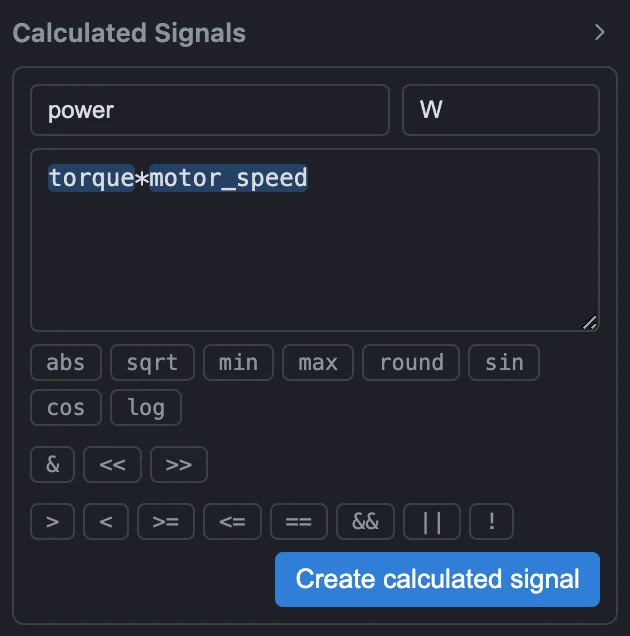
A calculated signal is a new channel derived from one or more existing ones by a formula, rather
than something your data logger actually recorded - the same idea as a math/virtual channel in a
tool like ETAS MDA. Formulas are written in mathjs syntax, and the quick-insert buttons in the editor
(abs, sqrt, min, max, round,
sin, cos, log, the bitwise operators, and the comparison/logical
operators) are shortcuts, not a restricted list - any mathjs function is available even without its
own button.
Referencing signals
A signal is referenced by typing its exact name as a bare identifier in the expression, or by dragging its name in from the signal list. A formula can reference another calculated signal, not just measured channels, so a formula can be built in layers: a unit conversion, a physics calculation built on top of that converted value, and a threshold or classification signal built on top of the physics calculation - each one its own named, independently reusable signal, rather than one increasingly unreadable expression.
How and when a formula evaluates
This behavior differs from a spreadsheet: a calculated signal is evaluated once, immediately, at the moment you create or edit it - point by point across every sample of the currently loaded measurement, not as a single vectorized array operation. It is a snapshot, not a live, reactive recalculation. If you go back and edit an earlier signal that a later one depends on, the later signal keeps its old, already-computed values; it does not automatically re-run just because something it referenced changed. To pick up new values, re-open and re-submit the dependent signal yourself.
Because every channel in a loaded measurement already shares one common time grid (see Getting started), the formula engine never needs to interpolate or align inputs before evaluating - it can assume a common grid by construction.
What gets saved
A session config saves the formula for each calculated signal, not the computed values it produced. Reopening that config - whether against the same file or a different one - re-evaluates every formula fresh, against whatever measurement is loaded at that moment, in the order they were originally saved (so a signal that chains off another one still resolves correctly). If a saved formula references a channel the newly loaded file doesn't have, that one signal is silently skipped rather than failing the whole load.
Worked example. Given measured channels torque (N·m) and
motor_speed (rad/s), a calculated signal named power with expression
torque * motor_speed and unit W computes mechanical power at every
sample. A second calculated signal named power_kw, expression power / 1000,
unit kW, references the first calculated signal by name to re-express it in more
readable units - two named, independently visible signals instead of one hard-to-audit formula.
Units and naming
The unit field on a calculated signal is a free-text label - there is no dimensional analysis
checking that a formula's actual result matches the unit you typed, so torque * motor_speed
labeled m/s would compute without complaint even though that's the wrong unit. Every
signal name, measured or calculated, must be unique within its measurement; the app enforces this the
moment you try to save a calculated signal under a name already used by a measured channel or another
calculated signal.
Errors
A malformed formula - an empty expression, unbalanced parentheses, a leading/trailing operator, or a syntax mathjs itself rejects - is caught when you submit the signal, not continuously as you type, and shown as an inline error explaining what's wrong.